Contract Renewal Spreadsheet Template (Free Download)
Plus: Why You'll Eventually Outgrow It
Get the Free Template
Google Sheets template with columns for contracts, renewal dates, notice periods, and more. No email required.
I've been there. Calendar reminders set for the wrong date. A sticky note that said "check Salesforce contract" buried under a pile of other sticky notes. The confident thought of "I'll definitely remember that $15,000 renewal is coming up."
Spoiler: I didn't remember.
Most founders and ops people I talk to track contracts the same way - a mix of hope, memory, and scattered reminders that works until it really, really doesn't. The first step toward fixing this is usually a spreadsheet. It's free, you already know how to use it, and you can set it up in an afternoon.
So we built one. Not some generic project tracker with the columns relabeled - an actual contract tracking template designed for the specific problem of "don't let me miss another cancellation window." Download it, use it, and when you hit its limits (you will, probably around contract #20), we'll have something better ready.
Or, if you want something that calculates notice deadlines automatically and lets you export to your calendar, try our free Contract Tracker tool. No signup required. Data stays in your browser.
What's Actually in This Thing
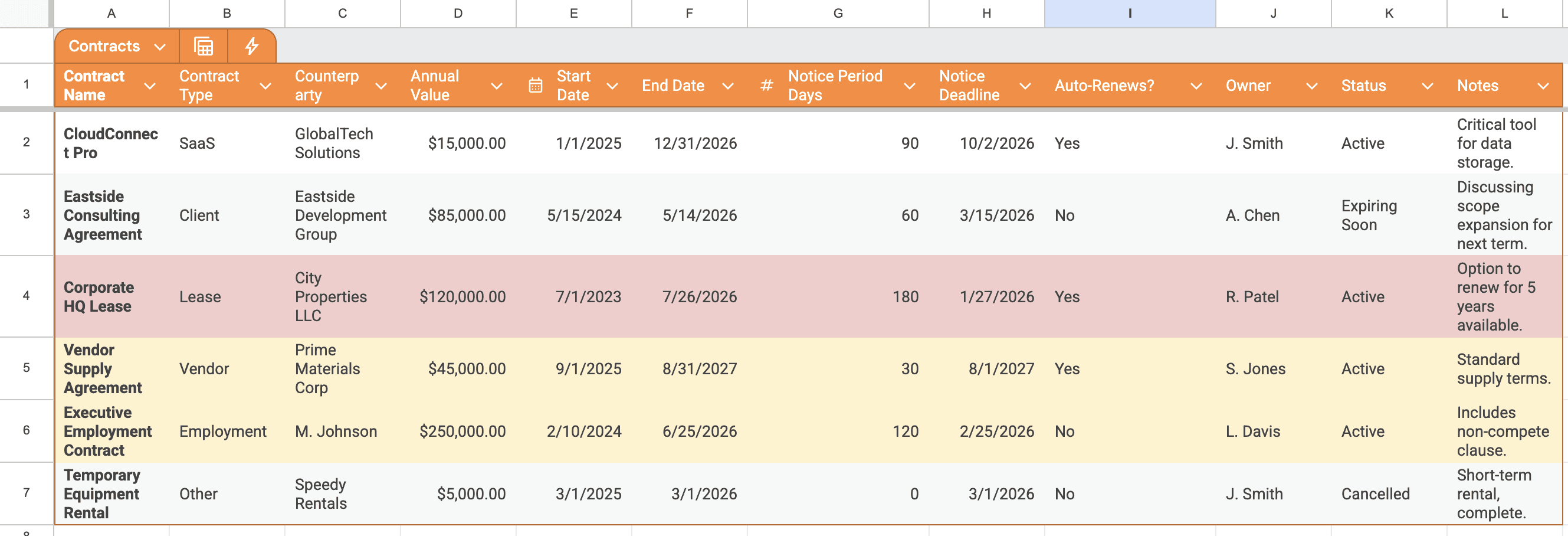
Here's every column and why it matters:
The template has conditional formatting built in. Contracts with notice deadlines in the next 30 days turn yellow. Overdue ones turn red.
Simple, but honestly? That yellow highlight has saved me more than once.
Setting It Up (15 Minutes, Tops)
Make a copy
Click the download button above. Google will ask if you want to copy it to your Drive. Say yes. If you prefer Excel, download as .xlsx instead.
Round up your contracts
This is the annoying part. Check DocuSign, your email, Google Drive, that folder on your desktop called "Contracts 2024 FINAL v2" - wherever they live. You need: contract name, start and end dates, the notice period (usually buried in the cancellation clause), and whether it auto-renews.
Fill it in
One row per contract. The Notice Deadline column calculates automatically - it takes your End Date and subtracts the Notice Period. That's your real deadline.
Set a recurring reminder to check it
Weekly works for most teams. Monthly if you don't have many contracts. The spreadsheet only works if you actually look at it.
Assign owners
Every contract needs one person responsible for it. Not "the team" - one actual human who will get blamed if it slips through.
Notice Period vs. Renewal Date
Here's the mistake almost everyone makes: tracking the renewal date instead of the notice deadline. They're not the same thing.
Miss November 2nd and you're locked in for another year. The January date is meaningless if you need 60 days notice to cancel.
I learned this the hard way with a marketing tool we'd stopped using. The contract renewed January 1st. I thought, "I'll cancel in December." What I didn't realize: the contract required 90-day notice. By the time I tried to cancel, we were already past the October 3rd deadline. Another $8,400 for software nobody was using.
That's why the Notice Deadline column exists. It's the date you need to act by, not the date you'll get charged.
Why This Will Eventually Stop Working
Look, I'm giving you a spreadsheet template while also building a product to replace spreadsheets. That might seem contradictory. It's not.
Spreadsheets are genuinely the right tool when you have 5-15 contracts and one person managing them. But they break down in predictable ways as you grow:
89% of contracts auto-renew by default. A spreadsheet you forget to check is the same as having no tracking at all. The contracts don't care that you were busy.
When It's Time to Move On
The spreadsheet has done its job when any of these become true:
- You're tracking more than 15-20 contracts
- You've missed a deadline because you forgot to check the spreadsheet
- Multiple people need to access and update it
- You want actual reminders, not just a document to check
- You're spending real time hunting through PDFs for dates and terms
At that point, you've got two options. Enterprise contract management software that costs $500+/month, requires a sales call, and takes weeks to implement.
Or something built for smaller teams. That's what we're making.
The Progression Most Teams Follow
What We're Building
PactAlert is for the moment you outgrow the spreadsheet. The short version:
But honestly? Start with the spreadsheet.
It's free, it works, and you'll learn a lot about your contracts just by filling it in. When you hit the wall - and if you're growing, you will - we'll be here.
Ready for the next level?
When spreadsheets aren't enough, PactAlert takes over. Automatic alerts, obligation extraction, zero manual updates.
Join the Waitlist